Fire-safety inspection and servicing contractor, 3-4 person office
Field Service ERP for a Fire-Safety Inspection Contractor: Paper Books to a 42,000-File Digital Archive
Years of finished work orders, invoices and quotes sat scattered across filing cabinets, a shared drive of scanned photos, and two Excel workbooks. Nobody could open one client's file and see the whole history in one place. The receivables sheet alone ran north of $1.7 million across roughly 490 rows, with duplicate and hidden rows in it that the client's own staff had stopped trusting.
What we built
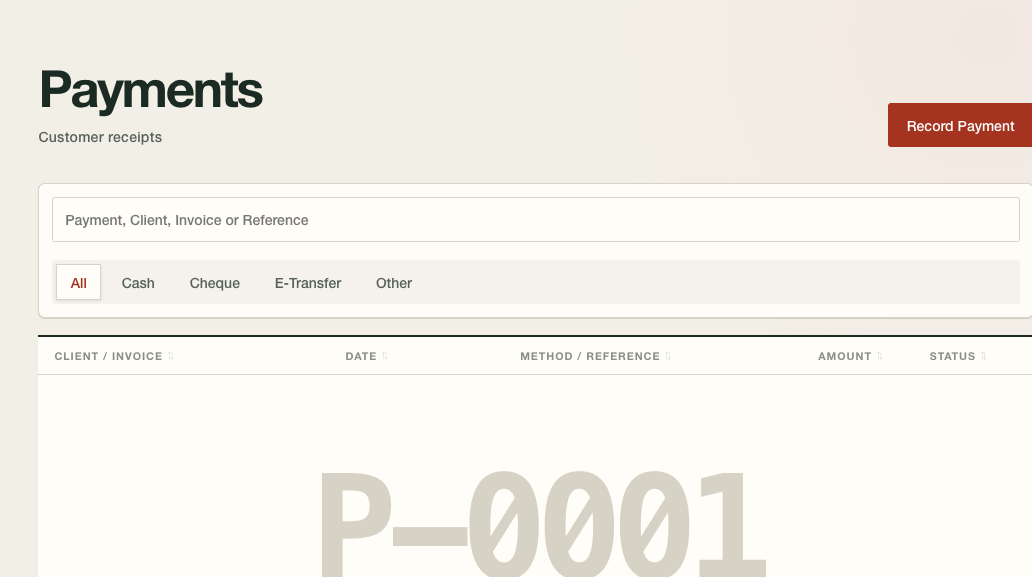
One ERP platform holding the client's full operating history: 42,000 legacy documents migrated and filed by client and by year, an audited import of the old receivables that resolved every duplicate, hidden and double-counted row, and three staff roles with the boundaries enforced at the database layer so a coordinator can never click into an invoice.
What the record shows
Five separate passes re-derived every dollar in the old receivables book before any of it went into the new system, landing on roughly $1.7 million across about 490 rows. The archive migration moved close to 42,000 legacy files into a structure filed by client and by year. Three staff roles keep money away from people who don't need to see it, and that wall sits at the database layer, not on a menu setting anyone could click around.
Where the paper archive lived
The client ran a fire-protection inspection and servicing business out of a 3-4 person office. Filing cabinets held years of finished work orders, invoices and quotes. One client’s full history sat scattered across a paper folder, a scanned photo on a shared drive, an Excel row and a Word document, and pulling all of it together took an afternoon of digging rather than a click.
There wasn’t a shared filing standard, either. One document type lived under the customer name, another under the job number, a third under whoever saved it last and however they happened to spell the street that day. The office knew where things were because the same two or three people had always known where to look. Anyone new to the job started from zero.
The receivables spreadsheet nobody could fully trust
Accounts receivable lived in two Excel workbooks kept up by hand. An independent audit re-derived every figure from the raw files, five separate times, before anyone trusted the totals. What it found:
- Outstanding invoices came to north of $1.7 million across roughly 490 rows, once two confirmed duplicate rows were pulled out.
- The invoice number was no kind of key. The same number turned up on two separate invoices inside one year’s sheet, and two historical sheets shared over a hundred numbers with almost none of them pointing at the same document. Working out which invoice an old row meant took the number, the site and the amount together.
- Tens of thousands of dollars of the book sat hidden in the spreadsheet. Those rows counted toward every total while showing up nowhere on screen, because the sheet’s autofilter range had gone stale against its own data.
- Two dozen invoices showed up as outstanding and paid at the same time, some of them with records that fought each other. One carried a partial-payment note for one amount while the payments sheet recorded two separate cheques against it totalling something larger. Staff had flagged that one “get back to this,” and nobody ever did.
- Roughly two-thirds of the rows had no reliable bill-to entity on them, only a job-site address, and the site address isn’t always who pays the bill.
- A meaningful share of the outstanding book was more than 90 days overdue, and one client relationship accounted for a lopsided slice of the whole total.
This is what “just use a spreadsheet” turns into after enough years. Nobody sat down to build an unreliable ledger. It piled up a row at a time until the row count and the recycled invoice numbers made the thing impossible to read at a glance.
One platform to hold the whole history
We built the client a field-service operations system on an open-source ERP platform. Its job is to hold every document the business has ever produced, in one place, filed the way the office already talks about its own paperwork. Open a client and you can read their history without a second search.
The three-role permission model
Three roles, with the boundaries enforced down at the permission layer where nobody can click around them:
- Admin sees the lot, money included.
- Coordinator/office runs intake, scheduling and quotes, and cannot reach an invoice or a payment. The block sits at the API layer, so no menu setting can undo it.
- Technician works on a phone, sees his own assigned jobs and nothing else, and loses the job’s data the moment it’s invoiced.
Partway through the project, the business owner named a specific fear. A staff member could walk out with the company’s data, the way anyone could once copy an entire shared folder off the old file storage in a single click. He wanted a system where nobody could download the app or pull information out of it in bulk.
We didn’t promise him an unbreakable system, because that promise would have been a lie. The new system already makes you drill into one document at a time, a structural difference from the old shared-drive setup. On top of that we offered something concrete: cap how many documents any one staff member can open in an hour, and fire an automatic alert when someone goes past the cap. No system, custom or off the shelf, stops a person photographing their own screen, and we said so out loud rather than glossing over it.
A follow-up audit checked the “by design” permission claim against the actual configuration instead of assuming it held. Two real gaps turned up between what had been claimed and what the system enforced. Both got fixed. We’d rather tell you that than say the system is secure and leave it there.
The 42,000-file archive and the legacy AR import
Two migrations ran next to the new system, because “start fresh and forget the old records” is not an answer you give a business with years of client history behind it.
The per-client document archive brought roughly 42,000 legacy files over from the client’s old file storage: invoices, quotes, reports, certificates, correspondence. They’re filed by client, by document type and by year, under the words the office already uses for them.
The legacy accounts-receivable import moved the historical invoices and payments out of the two Excel workbooks into the new system as real ledger documents that affect the books. Every defect the audit turned up, the duplicate rows, the recycled invoice numbers, the hidden rows, the invoices marked paid and outstanding at once, went to the business owner for a decision. Nothing was quietly guessed at. That rule, ambiguity becomes a question for a human, held for the whole import.
Nightly on-host backups run alongside a separate off-host disaster-recovery copy. We ran a restore from both before go-live, so the client knows the archive comes back if something goes wrong.
Why this wasn’t an off-the-shelf archive
A 3-4 person fire-inspection office is exactly the size of shop generic field-service software is built for, and plenty of shops that size should buy it. This one went custom for reasons you can point at. Their own filing language became the system’s data model, so the business didn’t have to bend itself into somebody else’s folder structure. Most off-the-shelf tools don’t offer a coordinator structurally blocked from ever seeing money, a 42,000-file legacy archive organized in the client’s own filing terms, or a receivables import that treats years of messy history as something to reconcile rather than discard.
None of that makes custom the right answer for every shop this size. It worked here because the business carried enough operational history, and enough specific quirks in how it filed things, that squeezing it into someone else’s software would have cost the owner detail he cared about.
Show us the paperwork that slows the job down.
Send a rate card, work order, or tender package. We'll tell you if this kind of build fits before either of us wastes time.
Send a sample documentRelated pages
The service behind this build, the trade it serves, and another job like it.
All case studiesWorkflow Automation for Busy Shops
Built around your current tools, one owned workflow can connect field work, scheduling, invoices, and the records your office needs.
Service
Fire Safety Inspection Contractors
For fire-safety inspection shops that already use paper work orders, Excel and email. We build the missing workflow around ERPNext.
Industry
Dispatch, Quotes and Invoicing for a Fire-Safety Contractor: How a Phone Call Becomes a Paid Invoice
Dispatch ran through a group chat with no record of who took a job or when. Invoices and quotes came off Excel and Word templates, retyped by hand for every job, with numbering nobody had ever designed. Invoice numbers topped 5,500 in one year and restarted at 2000 the next, and quotes ran three separate numbering blocks at once. The office had no way to promise a customer an arrival window, and no way to see whether an emailed invoice had actually landed.
Case study
Scheduling, Field Work Orders, and QuickBooks Desktop for an HVAC Contractor
Work orders priced by hand on paper, a schedule with nothing in it to catch a double booking, on-call hours typed onto a timesheet every week by the office, and a bookkeeper retyping every invoice into QuickBooks Desktop off that paper trail. The crew had also killed one GPS rollout already.
Case study
Report Writing Corpus Built for an Arborist and Landscaping Firm
How an arborist and landscaping firm turned past arborist reports into a writing corpus, then turned their conclusions into guidelines for new drafts.
Built for an arborist and landscaping firm