Fire-safety inspection and servicing contractor, office-to-technician dispatch
Dispatch, Quotes and Invoicing for a Fire-Safety Contractor: How a Phone Call Becomes a Paid Invoice
Dispatch ran through a group chat with no record of who took a job or when. Invoices and quotes came off Excel and Word templates, retyped by hand for every job, with numbering nobody had ever designed. Invoice numbers topped 5,500 in one year and restarted at 2000 the next, and quotes ran three separate numbering blocks at once. The office had no way to promise a customer an arrival window, and no way to see whether an emailed invoice had actually landed.
What we built
One call-to-payment workflow: office staff open a job record the moment the phone rings, offer or assign it to a technician without a group chat, and schedule it with a real arrival window. An accepted quote turns straight into a job, and the quote number rides onto the final invoice. A finished job produces an immutable PDF invoice by email with delivery status visible per invoice, and payments get recorded and reconciled against it until the job closes.
What the record shows
The client sat through a live walkthrough of the whole call-to-payment flow and signed off on it, with a short punch list left to clear and no request to rebuild anything. He came back afterward, on his own, asking for more automation, including wider use of recurring-contract scheduling. Nobody measured minutes saved per call or per invoice, so no such figure appears here.
Where the phone call used to go
Dispatch happened in a group chat. No system anywhere held a record of who got offered a job, who took it, or when. If the technician who answered first wasn’t the one the office meant to send, nothing caught it until somebody noticed a job hadn’t been touched.
Invoices came off an Excel template, one per job, typed up by hand after the office read a paper work order back off a photo. Quotes came off a Word template with boilerplate scope-of-work paragraphs, put together per client and site the same way each time. Neither numbering scheme had ever been designed by anyone. A sweep of the full history found invoice numbers up in the 5,500s by late 2025, then restarting in the 2000s for 2026. Quotes peaked in the 6,000s in 2025, and 2026 was running three separate numbering blocks side by side.
A job record before you hang up the phone
Office staff take the call and the job exists from that moment: customer, billing and service address, contact, what’s wrong, how urgent it is, how to get in, and any reference number the customer already uses for the site. Nothing waits for a technician to be free before it’s written down.
Quoting that carries its own number onto the invoice
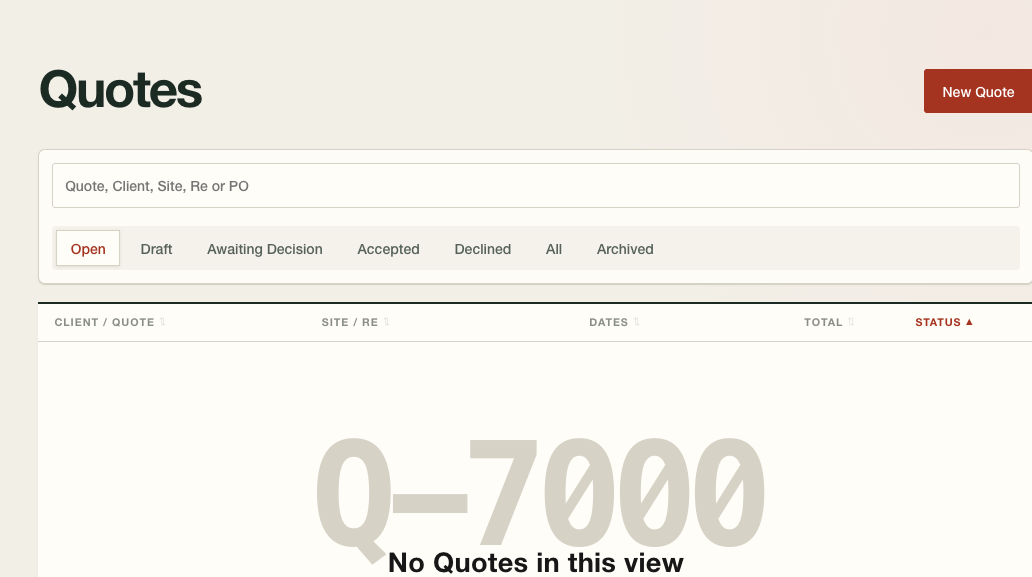
The quote screen is laid out like the client’s old paper quote, with the same short list of services the office already sells: annual fire alarm inspection, fire extinguisher inspection and tagging, sprinkler system inspection, kitchen suppression system inspection, a general service call, and a $60 truck charge when one applies. Add a line, set the rate, send it.
Accept the quote and it becomes a job on the spot, with the customer, addresses and contact carried straight across. The quote number rides along and lands on the final invoice as “As per quote #,” because that’s how the office already talks about its own paperwork, and a customer checking their invoice against the quote they signed doesn’t have to ask which one matches which.
Dispatch without a group chat
The office works from one dispatch view: unassigned jobs, jobs offered and waiting on a technician’s answer, jobs accepted and scheduled, offers that were declined or expired, and each technician’s existing workload. From there office staff either offer a job to several eligible technicians, where the first one to accept wins and the rest of the offers close automatically, or assign it straight to one person.
The technician gets a notification with the job number, customer, address, requested time, problem summary and an accept-or-decline button when it’s an offer. Every change of hands, who had the job, who it moved to, when it happened, gets written to the job’s own record instead of scrolling off the top of a chat thread.
Clock-in and clock-out can carry a GPS location when the phone has one to give, which it doesn’t always inside a mechanical room. A time that looks physically impossible for where the technician was still goes through. The system flags it for the office to look at, and a person decides what it means, rather than a rule stopping a technician’s day over bad signal.
Scheduling with a real arrival window
The schedule shows day, week and technician views alongside an unscheduled queue, so nothing sits unbooked without somebody noticing. Assign a technician to a time that overlaps another job of theirs and the office sees a warning, but the save still goes through. A real job sometimes runs long, and the schedule flags that for the office to sort out instead of stopping the save outright. A job can carry two technicians at once when the work calls for it, and every reschedule or cancellation keeps its reason attached to the job’s history rather than living in someone’s head.
That schedule is also what lets the office promise a window instead of a single minute, because a window is what actually gets kept when a job before it runs long.
Closing the job from the technician’s phone
The technician finishes the job on the same phone that took the assignment, standing on site. He works through the checklist, records what he did and what he used, and can pick up a customer signature and a photo before he leaves. Nothing goes back to the office as a paper copy or a photograph of one, and nobody retypes it later.
That matters most in what happens next. A job the technician has closed on his phone already carries the description, the time and the materials the office needs to bill it, in the technician’s own words instead of a scan somebody has to read and re-key.
Emailed estimates and one-click invoices
A job can’t move to billing until the record backing it is actually complete: a verified description of the work done, verified time, verified materials, a customer email on file, a billing address, tax applied, and office sign-off. Anything missing shows up explicitly instead of blocking the office with an unexplained error.
Once a job clears that bar, finishing it produces an invoice from the verified job data in one step: tax applied, every line traced back to the labour, material or adjustment behind it, and an immutable PDF generated the moment it’s approved. Even if two people finalize jobs at the same instant, they can’t come away with the same invoice number, and a voided or cancelled number stays on the record instead of getting handed to someone else later.
Monthly and quarterly maintenance contracts run through the same path. An inspection contract renews on its own schedule rather than waiting on a phone call, so the office sees the next visit coming and the invoice for it goes out the same way any other finished job’s does, on time and without someone having to remember the date.
Invoice delivery you can actually see
The office previews and sends the invoice from inside the system rather than switching to email and attaching a file by hand. The customer sees the invoice number, dates, addresses, the job and quote it traces back to, a plain description of the work, the labour and materials, and the total with tax broken out.
Behind that, the system keeps its own record: when the PDF was generated, when it was approved, who it was sent to, when it went out, whether delivery failed, whether it was resent, and exactly which version of the PDF landed in the customer’s inbox. Nobody has to take the office’s word for whether an invoice actually arrived.
Payment and reconciliation
A job stays open until it’s paid, and the system tracks payment against an invoice however it actually comes in: in full, in parts, across more than one payment, as an overpayment, a refund, a reversal, or a processing fee taken off the top. Where a payment provider hands back a reference tied to the invoice, matching happens on its own. A cheque, cash or e-transfer that doesn’t carry a clean reference goes to the office for a human to match by hand, and anything ambiguous sits in a queue for a person to resolve rather than getting matched on a guess.
What’s deliberately not claimed
Rounding “the client signed off after a demo” up into a results claim would be easy and dishonest, so the line sits here instead. The client sat through a live walkthrough of the whole flow, from intake to a paid invoice, and signed off on it with a short punch list left to clear and no request to rebuild anything. He came back afterward, unprompted, asking for more automation, which reads as real adoption in a way a testimonial doesn’t.
Nobody measured time saved, per call, per quote or per invoice. Billing errors and disputes were never counted before or after, and neither was how fast a job turned into cash in the bank. All three would be easy to believe, given how much retyping the old process took, but believing something isn’t measuring it, and those numbers were never collected. If you want to know what a change like this is worth in real minutes or real dollars, that comes from watching a business run on the new system for a while. A case study about the build can’t tell you.
Show us the paperwork that slows the job down.
Send a rate card, work order, or tender package. We'll tell you if this kind of build fits before either of us wastes time.
Send a sample documentRelated pages
The service behind this build, the trade it serves, and another job like it.
All case studiesWorkflow Automation for Busy Shops
Built around your current tools, one owned workflow can connect field work, scheduling, invoices, and the records your office needs.
Service
Fire Safety Inspection Contractors
For fire-safety inspection shops that already use paper work orders, Excel and email. We build the missing workflow around ERPNext.
Industry
Scheduling, Field Work Orders, and QuickBooks Desktop for an HVAC Contractor
Work orders priced by hand on paper, a schedule with nothing in it to catch a double booking, on-call hours typed onto a timesheet every week by the office, and a bookkeeper retyping every invoice into QuickBooks Desktop off that paper trail. The crew had also killed one GPS rollout already.
Case study
Report Writing Corpus Built for an Arborist and Landscaping Firm
How an arborist and landscaping firm turned past arborist reports into a writing corpus, then turned their conclusions into guidelines for new drafts.
Built for an arborist and landscaping firm
Landscaping Tender Pipeline for Provincial and Municipal Bids
How an arborist and landscaping firm turns a provincial or municipal tender into a priced, cited quote draft that a person certifies before it goes out.
Built for an arborist and landscaping firm